We may earn commissions when you purchase through our links, with no extra cost to you.
3 January 2026
Written by Human & AI

If you’re juggling currencies or sending money overseas, you want a service that’s upfront about costs and doesn’t make things complicated. Wise claims to offer real exchange rates, clear fees, and quick international transfers – but does it really deliver?

Wise stands out for transparent fees and mid-market rates, though it’s not always the absolute cheapest or fastest for every scenario. You can send money to a bunch of countries, hold over 40 currencies, and use a debit card tied to your balance. But fees shift depending on how you pay, and support can feel a bit limited sometimes.

Before you hit send, it’s worth understanding how Wise handles fees, limits, speed, and security. A closer look might help you decide if it beats your usual bank or another transfer app for your needs.

Key Takeaways

Feature Summary
Exchange Rate Mid-market, no markup
Fees Shown upfront, varies by method
Supported Currencies 40+ held, 80+ sent
Account Types Personal, Business, Multi-currency, Assets

What Is Wise?

Wise is a fintech company that lets you send, receive, and hold money in lots of currencies. Their big thing? Low, transparent fees and real exchange rates instead of the padded rates banks tend to sneak in.

Company Background

Launched in 2011 as TransferWise by two Estonian founders, Wise came out of frustration with excessive bank charges for cross-border transfers. The name changed to Wise as it grew beyond just money transfers.

Wise went public on the London Stock Exchange in 2021. It’s regulated by the Financial Conduct Authority (FCA) in the UK, and follows local rules elsewhere.

Millions of people and businesses now use Wise every month. You can access it on the web or via their app for sending, holding, or receiving payments in different currencies.

How Wise Differs from Banks

Banks typically add a markup to the exchange rate, making your transfers cost more than you think. Wise uses the mid-market rate, the one you’d actually see on currency markets. Instead of hiding costs, Wise charges a clear, upfront fee you see before confirming.

With a multi-currency account, you manage 40+ currencies from a single dashboard. Most banks? You’d need separate accounts for each currency. Wise also throws in perks like:

  • Local bank details in select countries
  • A debit card for spending your balance
  • Apple Pay and Google Pay support

Everything’s managed online with no branch visits needed.

Wise’s Mission and Growth

Wise talks a lot about “money without borders.” They want moving money between countries to feel as effortless as a local transfer.

They don’t profit from exchange rate markups - just the service fee. That’s a big draw for freelancers, remote workers, and small businesses operating internationally.

Wise now does more than just person-to-person transfers. You can receive payments, pay invoices, and even invest through Wise Assets (in some regions).

Wise Account Types & Features at a Glance

Account Type Main Features Fees
Personal Send/receive/spend globally, no monthly fee 0.35%–1.5% per transfer
Multi-currency Hold 40+ currencies, local bank details Conversion fee only
Business Batch payments, team cards, integrations One-time setup fee, then pay-as-you-go
Assets Invest balance in funds, not available everywhere Investment product fees

Personal Wise Account

With a personal Wise account, you can send, receive, and spend money internationally. No need for a foreign bank account. Signing up is quick, and there’s no monthly fee.

  • Send money to 160+ countries
  • Pay by bank transfer, debit, or credit card
  • Track transfers in real time
  • Use a Wise debit card (physical or virtual)

Fees usually run between 0.35% and 1.5%, depending on currency and payment method. You’ll also get local account numbers in select currencies, so you can receive payments like a local.

Multi-Currency Account

This is Wise’s core feature. Hold and manage 40+ currencies from one spot. Convert between them instantly at the mid-market rate, plus a small, visible fee.

  • Get local bank details (like IBAN, sort code, routing number) in major currencies
  • Receive payments from clients or employers without extra international charges
  • Order a Wise debit card - spend from the right currency automatically
  • Two free ATM withdrawals each month (then, small fees apply)

Wise Business Account

Freelancers, startups, and small businesses will find the Wise Business account handy for international payments. There’s a one-off setup fee (e.g., 45 GBP/50 EUR) but no monthly maintenance fee for basic use.

  • Hold/convert 40+ currencies
  • Local account details in big currencies
  • Batch payments
  • Integrations with accounting tools/APIs
  • Issue cards to team members

Conversion fees are the same as personal accounts, keeping it simple for managing payroll or paying international suppliers.

Wise Assets

Wise Assets lets you invest some of your balance in low-cost funds (available in certain regions, like parts of the EEA). Returns aren’t guaranteed, and your money can go up or down in value. It’s not a bank deposit, but it’s regulated as an investment product where available. If you want a taste of global markets without leaving Wise, this is a straightforward option.

Wise Account Types & Features at a Glance

Account Type Main Features Fees
Personal Send/receive/spend globally, no monthly fee 0.35%–1.5% per transfer
Multi-currency Hold 40+ currencies, local bank details Conversion fee only
Business Batch payments, team cards, integrations One-time setup fee, then pay-as-you-go
Assets Invest balance in funds, not available everywhere Investment product fees

Personal Wise Account

With a personal Wise account, you can send, receive, and spend money internationally. No need for a foreign bank account. Signing up is quick, and there’s no monthly fee.

  • Send money to 160+ countries
  • Pay by bank transfer, debit, or credit card
  • Track transfers in real time
  • Use a Wise debit card (physical or virtual)

Fees usually run between 0.35% and 1.5%, depending on currency and payment method. You’ll also get local account numbers in select currencies, so you can receive payments like a local.

Multi-Currency Account

This is Wise’s core feature. Hold and manage 40+ currencies from one spot. Convert between them instantly at the mid-market rate, plus a small, visible fee.

  • Get local bank details (like IBAN, sort code, routing number) in major currencies
  • Receive payments from clients or employers without extra international charges
  • Order a Wise debit card - spend from the right currency automatically
  • Two free ATM withdrawals each month (then, small fees apply)

Wise Business Account

Freelancers, startups, and small businesses will find the Wise Business account handy for international payments. There’s a one-off setup fee (e.g., 45 GBP/50 EUR) but no monthly maintenance fee for basic use.

  • Hold/convert 40+ currencies
  • Local account details in big currencies
  • Batch payments
  • Integrations with accounting tools/APIs
  • Issue cards to team members

Conversion fees are the same as personal accounts, keeping it simple for managing payroll or paying international suppliers.

Wise Assets

Wise Assets lets you invest some of your balance in low-cost funds (available in certain regions, like parts of the EEA). Returns aren’t guaranteed, and your money can go up or down in value. It’s not a bank deposit, but it’s regulated as an investment product where available. If you want a taste of global markets without leaving Wise, this is a straightforward option.

How Wise International Transfers Work (With Data)

Wise lets you send money abroad at real exchange rates, with no hidden markup. You can pick from several payment methods and delivery options, but the best choice depends on your needs.

Transfer Process

  1. Enter the amount and destination country.
  2. Wise shows the exact fee, exchange rate, and estimated delivery time before you pay.
  3. Choose how to fund your transfer: bank transfer (ACH), wire, debit/credit card, Apple Pay, Google Pay, or SWIFT (for some routes).
  4. Wise converts your money and sends it to the recipient’s bank account, usually no cash pickup, just direct deposit.

Transfer limits? They depend on your payment method. ACH can go up to $15,000/day, while SWIFT wires might allow more.

Where Can You Send Money?

Wise supports transfers to 80+ countries. From the US, you can send directly to about 50 countries, with more options if the recipient can accept USD, EUR, or GBP.

You can hold and convert 40+ currencies in your account. Some competitors reach more countries, so if you’re sending to a rare destination, double-check coverage first.

Transfer Speed: How Fast Is Wise?

Speed varies: sometimes it’s within seconds, other times it can take up to five business days. Wise says about half of transfers arrive within an hour, especially if you use a debit card and popular currency pairs.

Here’s a quick sense of delivery times:

  • India: seconds to 1 day
  • Mexico: about 2 hours
  • Greece: 1-2 days
  • Thailand: about 8 hours

Bank transfers and ACH usually take longer, as banks process them at their own pace. SWIFT wires can also add a bit of delay.

Before you send, Wise shows an estimated arrival time, so you’re not left guessing.

Wise Card & Payment Options

Wise offers a physical debit card, virtual cards, and mobile wallet support. You can pay in multiple currencies, shop online or in person, and withdraw cash when you need it. It’s not perfect, but it’s honestly one of the most flexible setups out there for travelers or anyone who gets paid in different currencies.

Wise Debit Card Review: Features, Fees & User Experience Explained

Wise Debit Card Features

The Wise debit card connects straight to your Wise multi-currency account. It’s a prepaid card, so you’ll need to top up before you spend - no borrowing here.

You can keep over 40 currencies in your Wise account. If you’re abroad, the card just grabs the local currency if you have it. Otherwise, it’ll convert your money at the mid-market rate, with a small fee tacked on.

Wise Debit Card Uses Supported?
In-store purchases ✔️
Online payments ✔️
International spending ✔️
Contactless payments ✔️

Unlike many banks, Wise doesn’t sneak in foreign transaction fees. You’ll see the exact conversion fee in the app before you hit confirm. If you lose your card, you can freeze or unfreeze it instantly, handy if you’re prone to misplacing things.

Virtual Cards

With Wise, you can spin up virtual cards right in the app. These work just like the physical card, but only exist digitally.

Virtual Card Use Case Benefit
Online shopping Protects your main card details
Subscriptions Easy to cancel if needed
Booking travel Separate from your main card

Each virtual card comes with its own number and security code, so if something goes wrong, you just delete that card – no fuss. Virtual cards pull from your Wise balance, so you’ll still need enough funds before paying.

Using Apple Pay and Google Pay

Add your Wise card to Apple Pay or Google Pay in a few taps. Pay with your phone or watch, and skip digging for your wallet.

Mobile wallet payments work in stores, online, and in apps that accept Apple Pay or Google Pay. Wise handles the currency conversion automatically if you’re paying abroad, so you don’t have to think about it.

There’s a bit of extra peace of mind here, as your full card number doesn’t get shared with the merchant. And if you lose your phone, you can lock it remotely.

ATM Withdrawals

Need cash? You can use your Wise debit card at ATMs around the world.

Wise gives you two free ATM withdrawals a month (up to about 265 USD or equivalent). After that, there’s a small fee per withdrawal. ATM operators might charge their own fee too, which Wise can’t control. If you have local currency in your account, it’s taken directly; if not, Wise converts it for you at the standard rate plus a small fee. To save money, try withdrawing more at once instead of making lots of small withdrawals.

Fees, Exchange Rates, and Transparency

Wise is all about low fees, real exchange rates, and clear breakdowns before you pay. You’ll know exactly what you’re paying, with no hidden bank fees or sneaky markups.

Wise Fees Structure

Wise fees depend on:

  • Which currency you send
  • Which currency your recipient gets
  • How you fund the transfer (bank, debit card, credit card, or Wise balance)

Usually, it’s a small fixed fee plus a percentage. Often under 1% for major currencies, though it varies. Paying by card costs Wise more, so it’ll cost you a bit more too. Funding from your Wise balance is usually cheapest. Before you send, you’ll see a full cost breakdown: transfer fees, conversion fees, and the amount your recipient gets. It’s refreshingly straightforward.

Mid-Market Exchange Rate

Wise uses the mid-market rate, the one banks use when trading currencies. Most banks say “no fees” but actually give you a worse exchange rate. That’s where they make their money. Wise doesn’t do this. You get the real rate, and the fee is shown separately. You can check the rate yourself on financial news sites if you want.

Currency Conversion and Transfer Fees

Sending money abroad? You’ll face two costs:

  • Transfer fees for sending the money
  • Currency conversion fees for exchanging currencies

Wise combines these into an itemized quote before you send. Some currencies (NZD, HKD, THB, TRY, CNY, etc.) cost a bit more because of local rules or banking costs. If you send euros outside SEPA using SWIFT, Wise adds a fixed fee to cover possible intermediary charges, so your recipient actually gets what you expect.

How Wise Compares to Banks

Banks usually hit you with:

  • Transfer fees
  • Marked-up exchange rates
  • Extra foreign transaction fees

That exchange rate markup is often hidden. Wise splits out the fee and gives you the real rate. For most people, it’s cheaper and more transparent, especially for small and medium transfers. If you’re moving huge sums or need complicated business stuff, banks might still be better. But for everyday transfers and currency swaps, Wise is tough to beat on price and predictability.

User Experience, Safety, and Customer Support

Wise leans into simple design, clear fees, and strong security. The app’s clean, and you can see everything by currency – no hunting around for info.

Ease of Use and App

Opening an account is quick, just a few minutes online. The Wise app lets you:

  • Hold and swap multiple currencies
  • Send money abroad
  • See all fees upfront
  • Freeze or manage your card

You see the rate and fee before you send, which means no nasty surprises. Most people say it’s easy and fast, and transfers usually arrive quickly. Some older users mention the ID checks can be a bit much, but overall, the app’s simplicity is one of Wise’s biggest wins.

Is Wise Safe and Regulated?

Is Wise safe? In a word: yes – at least as much as you can expect from a digital money service.

Wise isn’t a bank in most places; it’s an electronic money institution (EMI). That means it can issue e-money and process payments, but it doesn’t lend out your cash. Wise is regulated in different regions:

  • UK: Financial Conduct Authority (FCA)
  • EU: European regulatory frameworks
  • US: Works with partner banks, follows state rules

Your money is kept separate from Wise’s own funds in secure accounts or low-risk assets, depending on local laws. Security features include two-factor authentication, device checks, and transaction monitoring, so fraud risk is pretty low.

Customer Reviews and Trustpilot Ratings

Wise gets mostly high marks on review sites like Trustpilot, based on hundreds of thousands of user reviews. People highlight:

  • Fast transfers
  • Good exchange rates
  • Clear pricing
  • Easy, reliable app

Some folks complain about delays with account verification or compliance checks, and a few aren’t thrilled with slow support during busy times. Still, with so many reviews, you get a pretty honest picture of the ups and downs.

Customer Service and Support

Support is mostly digital: via in-app chat, email, or the help center. You’ll find answers for:

  • Identity verification
  • Tracking transfers
  • Payment delays
  • Managing your card

Response times can vary. Routine stuff usually gets sorted fast, but complex cases (like verification) might drag a bit. There’s no in-person service, so if you want a branch or to call someone directly, you might be disappointed. For most, though, the digital support model works and helps keep costs down.

Frequently Asked Questions

People have mixed feelings about Wise’s fees, support, and app, but review sites and forums give you a decent sense of what to expect.

What are the common customer complaints about Wise money transfer services?

The most common complaints are about account freezes and ID checks, which can delay transfers for days. Some users also mention slow or tricky-to-reach support, live chat isn’t always available, and phone lines have limited hours. There’s also some confusion around fees; while Wise uses the real exchange rate, the percentage-based transfer fee can feel higher than expected to some.

How do users rate Wise on Trustpilot?

Most Trustpilot reviews are positive, lots of four and five stars. People love the fast transfers and clear pricing. Lower ratings usually mention delays, account reviews, or trouble reaching support. Your experience will probably depend on how smooth your ID checks and payment methods go.

Are there any security concerns when using Wise for international transactions?

Wise uses HTTPS encryption and two-step login to keep your account safe. You’ll likely need to verify your identity at some point, which can feel strict, but it’s standard for regulated money services. The app does collect some data (like contact and financial info) tied to your identity, but that’s pretty normal for this kind of service.

Reddit User Feedback: Is Wise Good for International Money Transfers?

If you poke around Reddit, you'll notice a lot of folks seem pretty happy with Wise for sending money overseas or juggling different currencies. People often mention how the fees are upfront (no nasty surprises) and that you get the real exchange rate, none of that inflated nonsense.

What Reddit Likes What Reddit Complains About
- Transparent fees

- Mid-market rates

- Multi-currency accounts

- Sudden account reviews

- Transfer limits (especially big sums)

- Not always the cheapest

But, it's not all sunshine. Some people run into sudden account checks or hit limits, especially if they're moving a lot of money or doing something "unusual" in Wise's eyes. It's not always the cheapest option, either. Redditors like to compare it with Remitly, OFX, Xoom, and the usual suspects. Wise tends to win on transparency, but if you're hunting for rock-bottom costs, you might want to shop around.

How Reliable Is Wise for Sending Money Abroad?

Wise moves billions every month and has millions of customers. It's regulated and even trades on the stock market, if that sort of thing reassures you. You can send cash to more than 80 countries, though your options depend on the currency and how you want to pay. Some transfers land within hours, but a few might drag on for a couple of business days. That's just how it goes sometimes.

Honestly, reliability comes down to whether you pass their ID checks and punch in the right bank info. If you do, things usually go smoothly. If not, well, expect some delays. That's just life with financial services, right?

Wise Mobile App Review: Real User Ratings and Features Breakdown

People seem to like how straightforward the Wise app feels. You can keep an eye on transfers, check live exchange rates, and juggle different currencies, all without much hassle. It’s honestly pretty handy if you’re moving money around a lot.

Feature User Satisfaction (1-5)
Ease of Navigation 4.6
Tracking Transfers 4.5
Exchange Rate Info 4.4
Multi-currency Management 4.3

Some regions get Apple Pay and Google Pay support, which is a nice touch. The app lets you handle your Wise debit card and scroll through your transaction history, too. Nothing too flashy, but it works.
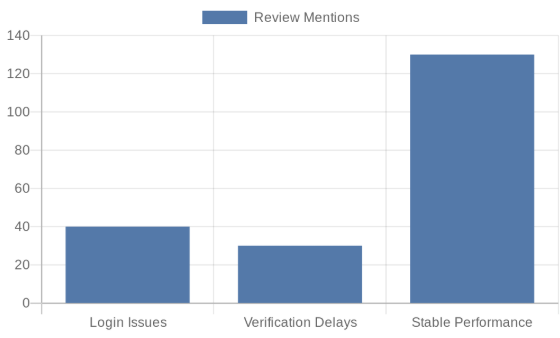
Of course, not everything’s perfect. A fair number of folks complain about login headaches or slow account verification. But once you’re past setup, most say the performance is solid. Guess it’s a bit of a mixed bag, but the positives seem to outweigh the negatives for day-to-day use.